The Code Treasure Map: Unraveling Programming Logic with Flowcharts

The Code Treasure Map: Unraveling Programming Logic with Flowcharts
For anyone starting to program, the blank screen of a code editor can be intimidating. The syntax of a language like Python or JavaScript can seem like a giant hurdle. But what if I told you that the biggest challenge — and the most important skill — isn't memorizing commands, but rather learning to think in a structured way?
Many beginners make the same mistake: they try to build a house without a blueprint. They jump straight into the code, writing lines without a clear plan, and end up with a messy, buggy program that's difficult to fix. They focus on the tool (the programming language) before understanding the design.
This is where Programming Logic comes in. It's the blueprint, the map, the recipe. It's the art of organizing your thoughts into a sequence of clear and unambiguous steps that a computer can follow. And the best visual tool for drawing this map is the Flowchart.
🤔 What is Programming Logic?
At its core, Programming Logic is the ability to break down a complex problem into a series of small, logical, and ordered steps. It's the "cake recipe" you create so that the computer can solve a problem.
A computer is incredibly fast and efficient, but fundamentally "dumb." It doesn't understand ambiguities or unspoken assumptions. It only does exactly what it's told. Programming logic is how we, humans, translate a need ("I want to know if a number is even or odd") into instructions that a machine can execute.
Almost all programming logic is based on three fundamental structures:
- Sequence: The execution of instructions one after another, in order. (Ex: Wake up, get up, brush your teeth).
- Decision (or Condition): The execution of a block of instructions if a certain condition is true. (Ex: If it's raining, take an umbrella).
- Repetition (or Loop): The execution of a block of instructions multiple times, while a condition is true. (Ex: While the dish isn't clean, keep scrubbing).
Mastering these three structures is the first step to thinking like a programmer.

🗺️ And Where Do Flowcharts Fit In?
If programming logic is the recipe, the flowchart is the visual and illustrated version of that recipe. It's a diagram that represents an algorithm or process, showing the steps as boxes of various types and their order by connecting them with arrows.
Instead of writing the logic in words (which can be ambiguous), you draw it. This forces you to think clearly and visualize the "flow" of your program even before worrying about semicolons.
The basic symbols of a flowchart are universal and easy to learn:
- Start/End (Terminal): An oval shape that marks where the process begins and ends.
- Process: A rectangle that represents an action or calculation (ex:
sum = a + b). - Decision: A rhombus (diamond) that represents a question with two possible outputs (usually "Yes" or "No"). This is where
if/thenconditions live. - Input/Output: A parallelogram that represents receiving data from the user (input) or displaying results (output).
- Flow Arrows: Lines that connect the shapes and indicate the direction of the process.
💡 Let's Build a Flowchart: The Coffee Example
To understand how this works in practice, let's map a daily process: "Check if I can make coffee."
The logic would be something like this: "I want to make coffee. First, I need to check if I have coffee grounds. If I do, I need to check if I have water in the coffee maker. If I have water too, I can turn on the coffee maker. Otherwise, I can't make coffee."
See how this transforms into a clear and unambiguous flowchart:
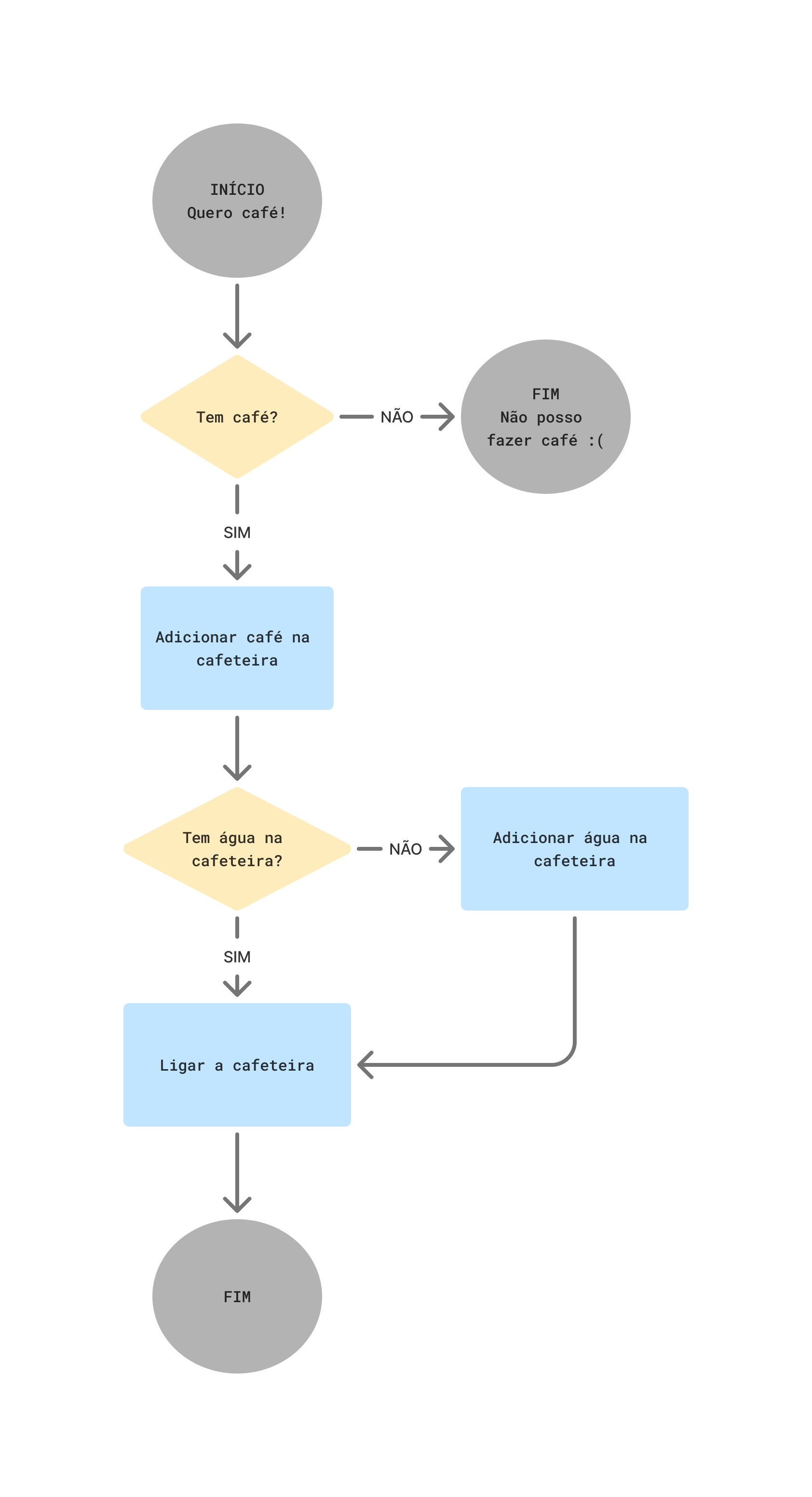
This diagram is a perfect representation of the logic. Any programmer, regardless of the language they use, can look at this flowchart and translate it into Python, Java, C# code, or any other. The plan is ready.
🛠️ Why Use Flowcharts? The Benefits of 'Thinking Visually'
The practice of creating flowcharts before coding might seem like an extra step, but the benefits, especially for beginners, are immense:
- Clarity and Communication: A flowchart is a universal language. It's much easier to discuss and refine a program's logic with a diagram than with abstract code blocks.
- Early Error Detection: It's much easier to find logical flaws (e.g., a path that leads nowhere or a condition that will never be met) in the design than by debugging dozens of lines of code.
- Simplifies Coding: With a flowchart ready, coding becomes a task of "translation," not "creation." You've already solved the logical problem; now it's just about writing the syntax.
- Living Documentation: A good flowchart serves as excellent high-level documentation of what your program does and how it makes decisions.
🚀 From Design to Code: Your Next Step
Learning to program is a two-part journey: learning to think logically and learning the syntax of a language. The most common mistake is to reverse this order.
The flowchart is the bridge between your idea and the final code. It forces you to slow down, plan, and build a solid foundation before laying the first "brick" of code.
Therefore, the next time you face a new programming challenge, resist the urge to rush to the code editor. Grab a pen and paper (or an online tool), draw the boxes and arrows, and map out your treasure. You'll find that with a good map in hand, the journey to finding the solution becomes much clearer, faster, and more rewarding.
This free website, diagrams.net, is an excellent online tool to easily and professionally create your own flowcharts.